
A web app developed to provide you with the fastest way to develop your prototypes and test them in real-time before any further progress in your project. With sophisticated, yet easy to use layout, it gives you a lot of freedom in your development.
UI/UX Designer & Full-stack Developer.
Final Year Project
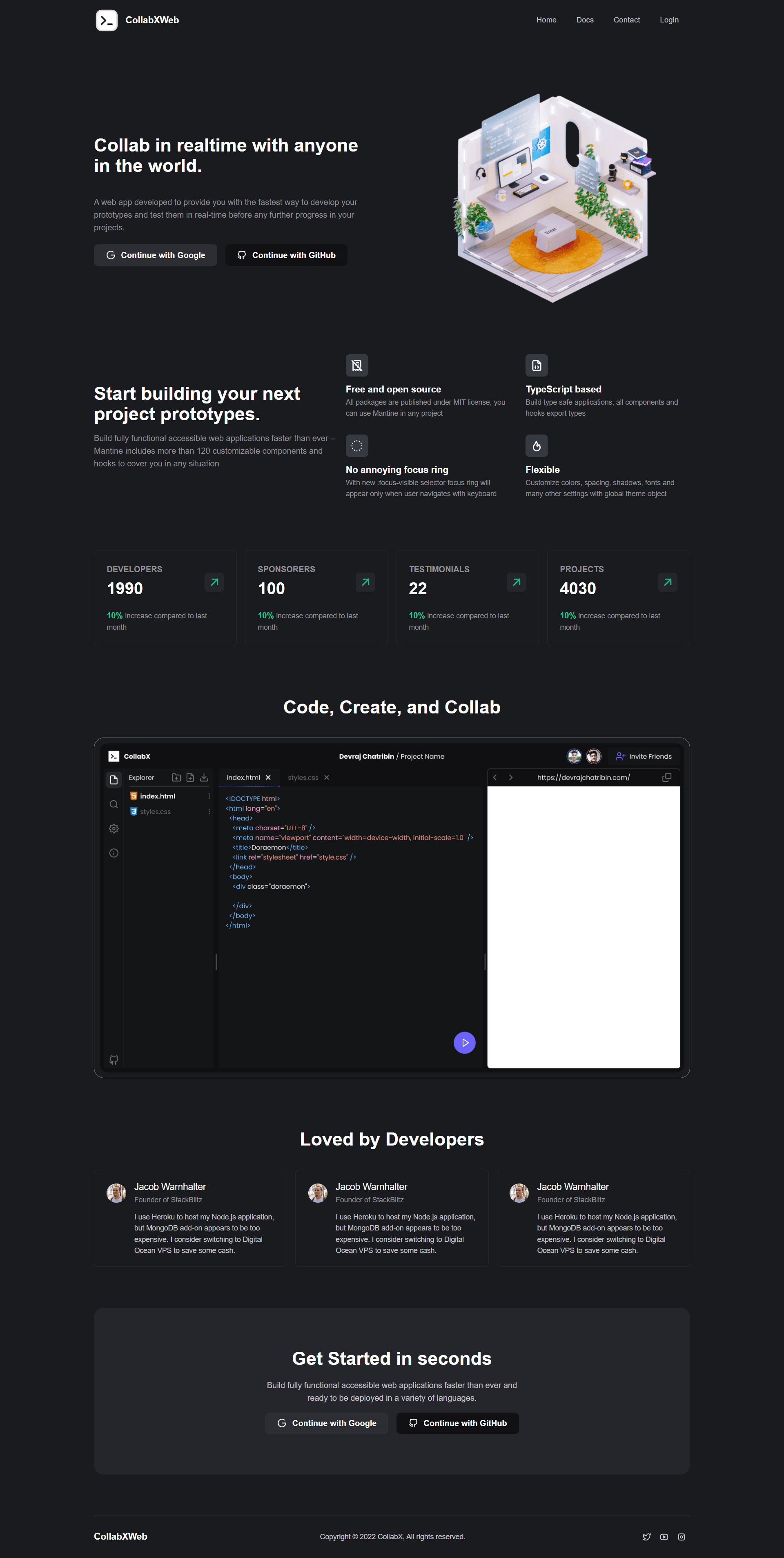
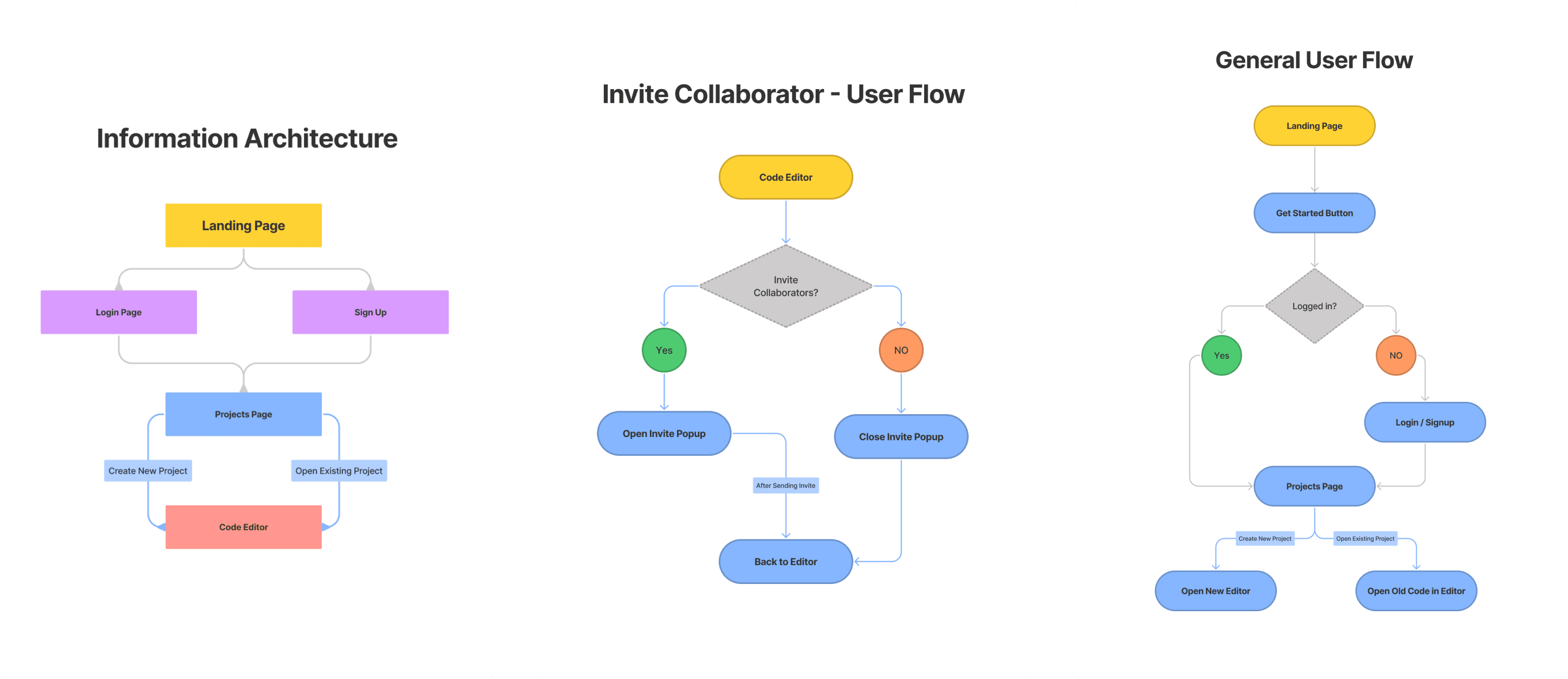
Landing Page
As soon as users land on our website’s landing page, they have the option to sign up using Google or GitHub accounts. They can also read through the features and other sections on the landing page.
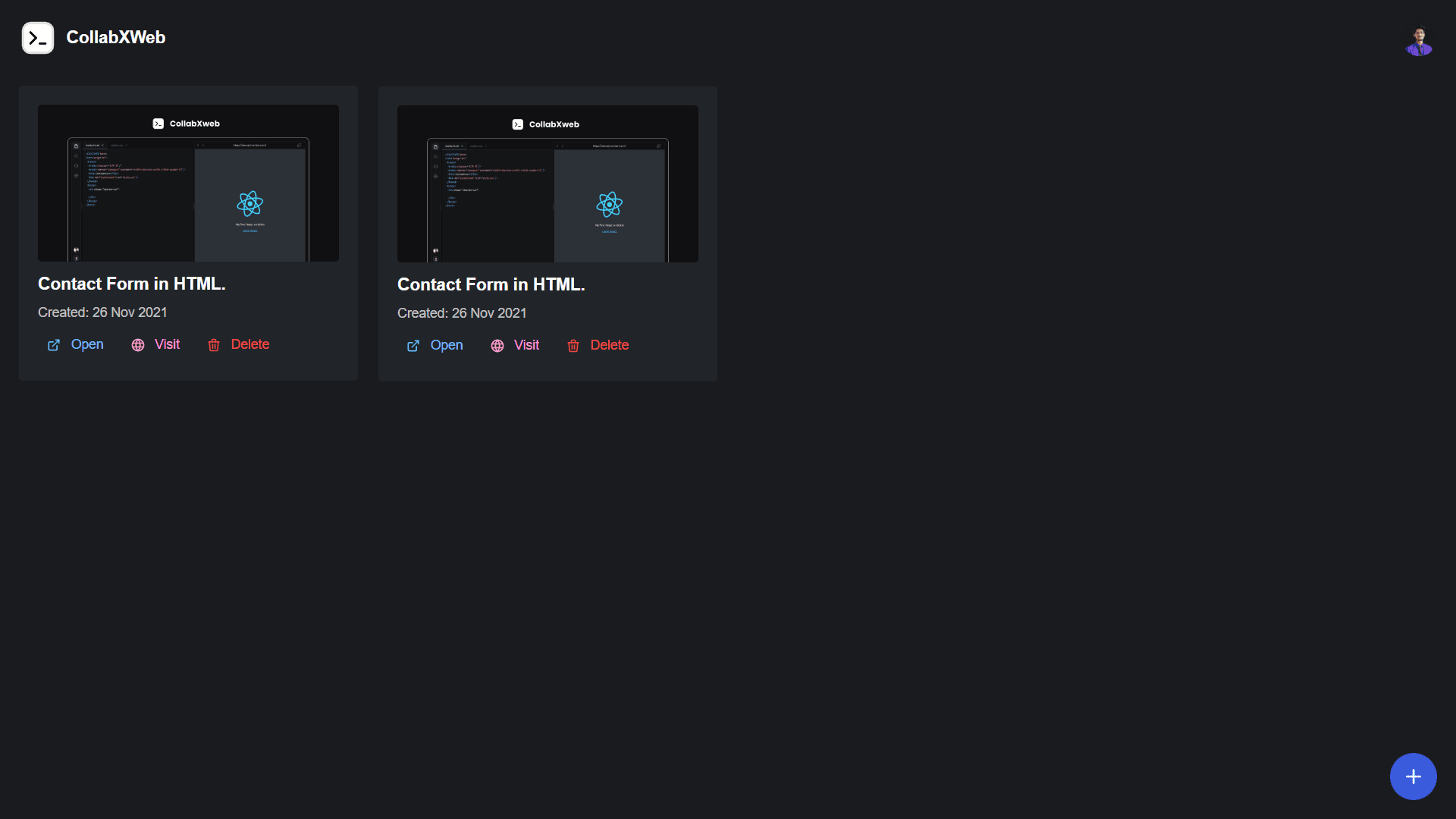
Projects Page
Once the user is logged in, it opens the projects page where user can either open existing project or create a new one.
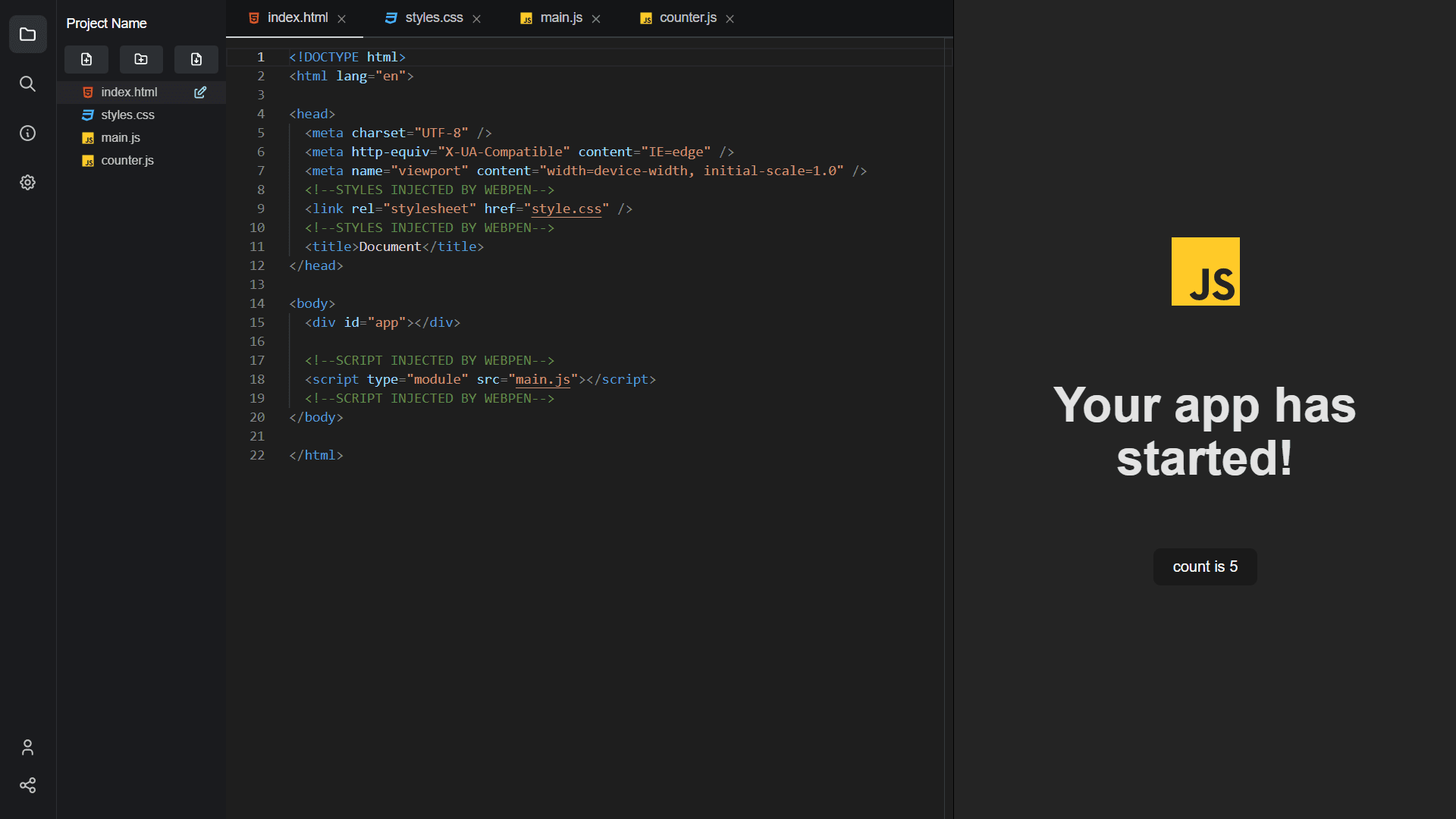
Code Editor
If the user opens an existing project or new project, it opens up the project inside the editor. Here, the user can type the code while simultaneously checking out the output in the preview window in real-time.
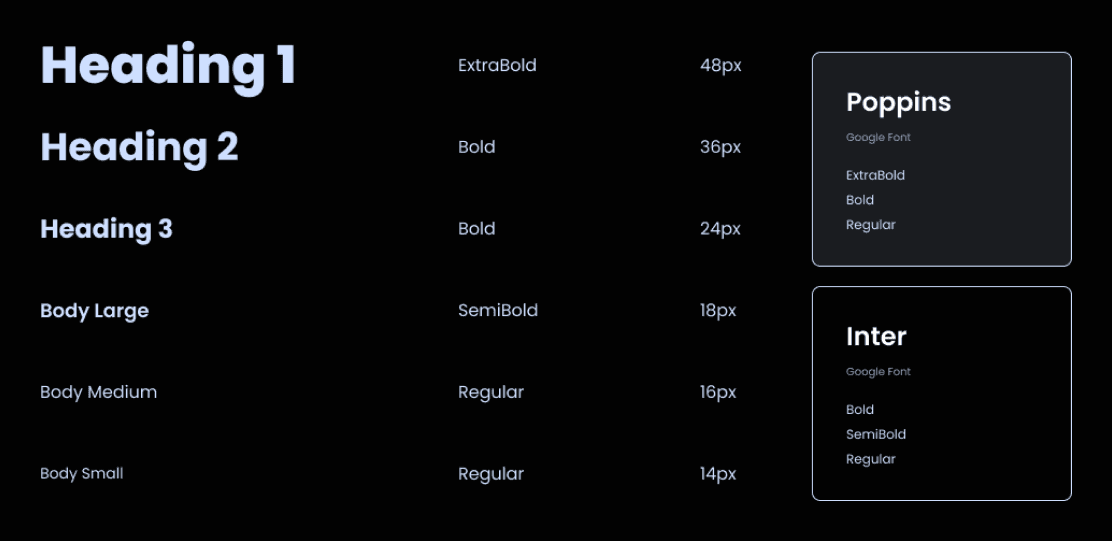
Typography
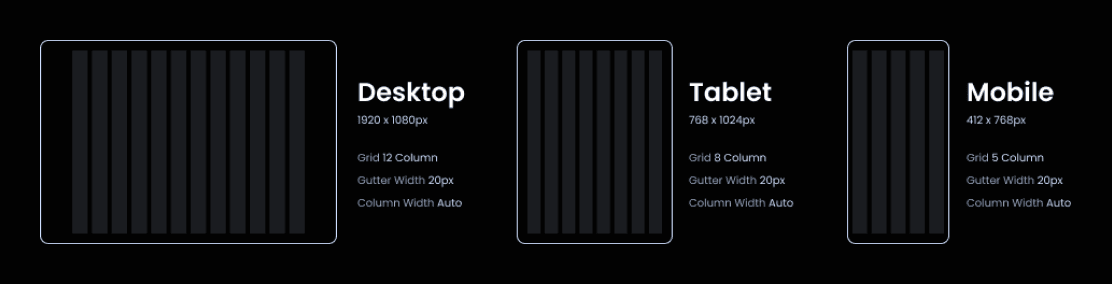
Grid Layout
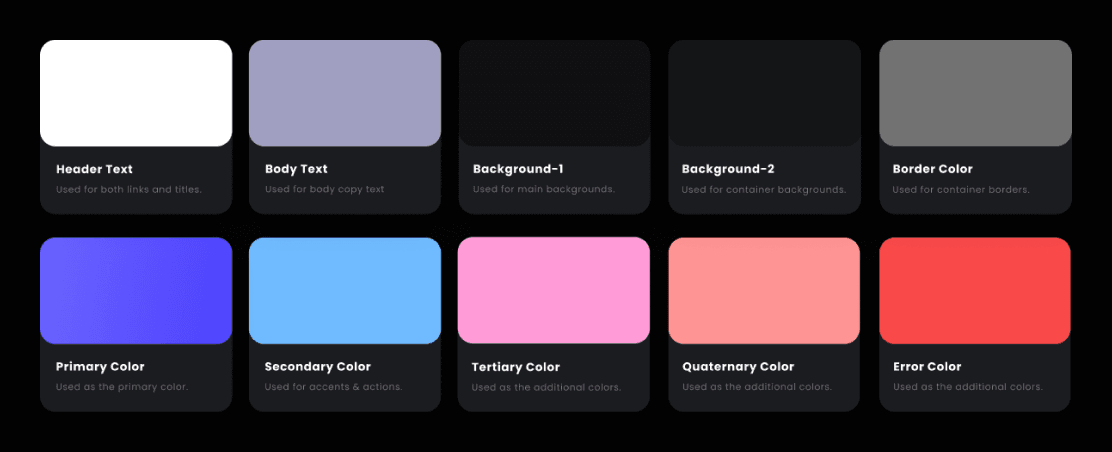
Color Palette
Technologies Used:
- NextJS: For building server-side rendering and static web applications using React.
- Mantine UI Library: React UI components library.
- Monaco Editor: Provides IntelliSense, Validation, and more customization.
- Figma: For designing the web app from scratch.
- NodeJS: It is an open source server environment which helps to work with various modules.
- Firebase: For Authentication, Firestore Database, Analytics.
- Esbuild: JavaScript Bundler used to bundle and inter-link the code files.
- Typescript: To catch mistakes early through a type system and to make JavaScript development more efficient.
Packages:
- TablerIcons: Icons Library.
- Redux: For managing states in JavaScript applications.
- LocalForage: Helps in offline storage using IndexedDB.
- Skypack: Load optimized npm packages.
- PathFX: Helps in defining path to the code files created in the browser.
- Lodash: Provides utility like creating templates and dynamically loading it into DOM.
- React-Arborist: A sortable, virtual, customizable tree component for React.
- React-Split-Pane: Provides resizing and splitting of sections on a webpage.
Features:
- Prototype and test your code quickly.
- Ease of coding from any location and any device including smartphones.
- Observe the changes live and also deploy your code.
- You can share the link to the prototype with a single click.
- No previous setup or software’s installation is needed.
- Quick and Lightweight.
- All the projects are stored online and are synced as soon as there are any changes made to the code.
Project Scope:
- The Realtime Code Editor, helps the developers to kick start new projects and begin coding in seconds since it has predefined templates for frameworks like ReactJS, AngularJS, VueJS, and VanillaJS.
- It offers a superfast development environment with a purpose-built for rapid web development in the browser.
- The Code Editor is collaborative meaning you can share your code and create projects together in real-time.
- It helps us prototype and test any features or snippets of code since it updates the preview Live, so you can see the effect of changes instantly as you code.
Flow Charts:
User Research:
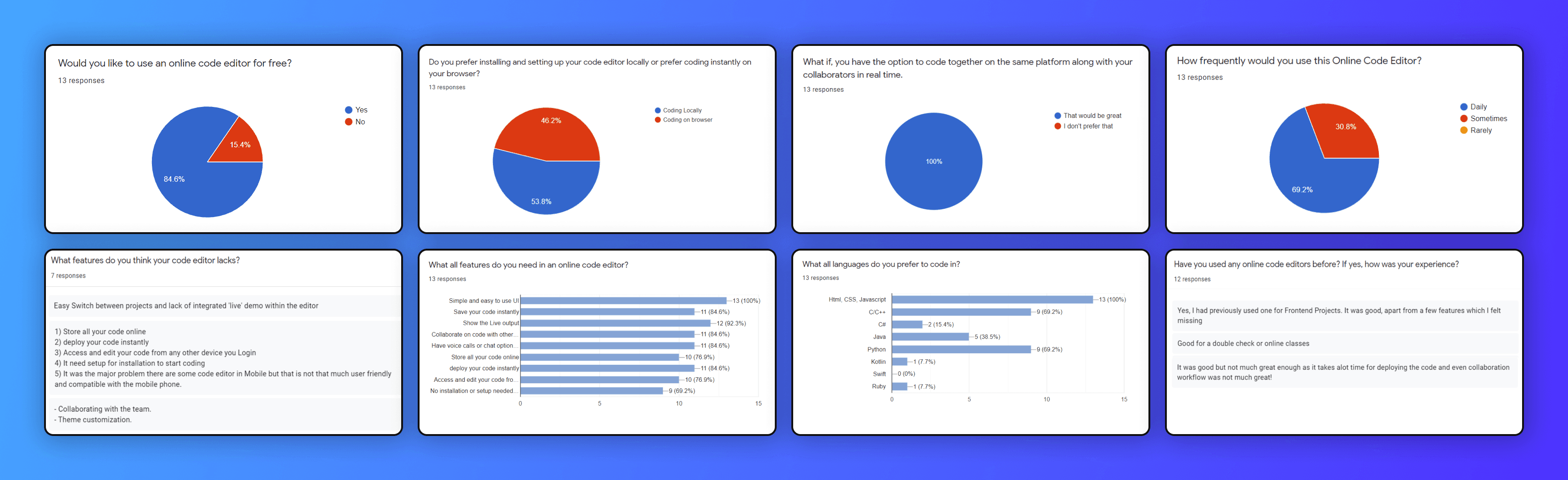
We created small user research where we circulated a google form consisting of questions that helped us to understand our product much better from the user’s point of view.
1. Would you like to use a Real-time Code Editor for free?
- It showed us what percentage of users would like to use our online code editor. Majority of the people were in favor of using a Real-time Code Editor. Only 15.4% of people were of the other opinion.
2. Do you prefer installing and setting up your code editor locally or prefer coding instantly on your browser?
- This was 50-50 since it depends on what they are working on. For example, if someone needs to run a code instantly, he wouldn’t prefer setting up his code editor, installing plugins, etc, so the browser is the best option for him/her.
3. What if you have the option to code together on the same platform along with your collaborators in real-time
- This was the most requested feature, that can enable the users to code collaboratively on their browsers itself, which is why we got 100% positive response from all our users.
4. Have you used any online code editors before? If yes, how was your experience?
- Many had used code editors and shared their experience about it. Some said the code editors which they had used lacked certain features. Some were of the opinion that deploying the code would take a lot of time and even the collaborative feature was not that great. Some said that it would be of great help for online classes and even double checking.
5. What features do you think your code editor lacks?
These were some of the features the people thought their editor lacked:
- Easy switch between the projects and lack of integrated ‘live’ demo within the editor.
- Collaborating with the team and theme customization.
- Store all your code online and deploy your code instantly.
- Access and edit your code from any other device and even login.
- It should not need any setup or installation to start coding.
- There was another major problem wherein the user said that there are code editors for mobile phones but they are not user friendly and compatible.
6. What all features do you need in an online code editor?
- Majority of the people said that it should be simple and should have an easy to use UI.
- Most of them also said that the code editor should show live output.
- Many were of the opinion that it should save and deploy the code instantly, collaborate on code with others and even have voice call or chat feature.
- A large number of people also said that they should be able to store the code online and access and edit it from any device.
- People were also of the opinion that it should not need any setup or installation.
7. What languages do you prefer to code in?
Html, CSS and JavaScript were the most requested languages. C, C++ and Python were next in the list. Java and C# were also preferred by some people. Very few people even wanted Kotlin and Ruby to code in. According to stats, the top requested languages were implemented first in our final product and other languages will be added in future versions.
8. How frequently would you use this Online Code Editor? And Would you like to have a short call with us to try out the final product?
A huge percentage of users said that they would love to use our online code editor and have a short call with us to try out the final product.
Ideate - Techyon Winner
Won 1st Place at Ideate in Techyon which is an annual tech event organized by PCCE (Padre Conceicao College of Engineering).
Conclusion
Nowadays, an online code editor is becoming increasingly essential due to the continuous advancements in technology. It provides users with the ability to easily write, test, and collaborate on coding projects. The main objective of an online code editor is to allow code execution without the need to install a compiler on the user's system. Instead, the code can be compiled and run directly on the web. Unlike traditional compilers, this online editor stores and executes all of a project's source code online through a web browser. This feature enables convenient access from any location or device. Additionally, the design of online code editors is simple and user-friendly, making them particularly efficient for beginners. Therefore, online code editors have a promising future and offer great opportunities for students, beginners, and developers alike.
Future Scope
Collaborate with developers across the world on the same project/codebase in real-time.
- While working on development projects, any programmers working on the project by team. Any programmer who has the access to the project can create, change, and add code inside the same project file. So, synchronization process is required between programmers to avoid code duplication, and to solve this synchronization problem integrated real-time collaboration is needed in a single environment
Audio/Chat feature which makes it easy to have a quick conversation within the editor.
- Real-time Communication (RTC) is a merging of communication and collaboration systems, which is combined of communication technologies, like Voice-over-IP (VoIP) telephony and instant messaging, and various collaborative application4,5. RTC technologies consist of four interconnected building blocks; consist of unified communications, presence awareness, contextualization and E-Collaboration portfolio6.
Download the code files as a ZIP Folder.
- Adding a download button inside the editor to download the code files. Once the download button is clicked it will run a function that will zip the code files and then download it onto the local machine directly from the Editor. This can be helpful when user wishes to work on the same code files on his local machine by loading the code files in any code editor.
Adding more templates to support other languages/frameworks.
- Currently we have implemented simple VanillaJS template which supports html, css, js files but, we have written the code in such a way that additional templates such as ReactJS with TypeScript etc. can be implemented easily and can be scalable in future.
Share this project
On this page
Share this project